Changelog
Follow new updates and improvements to Sudowrite.
Book Art? We've Got You Covered
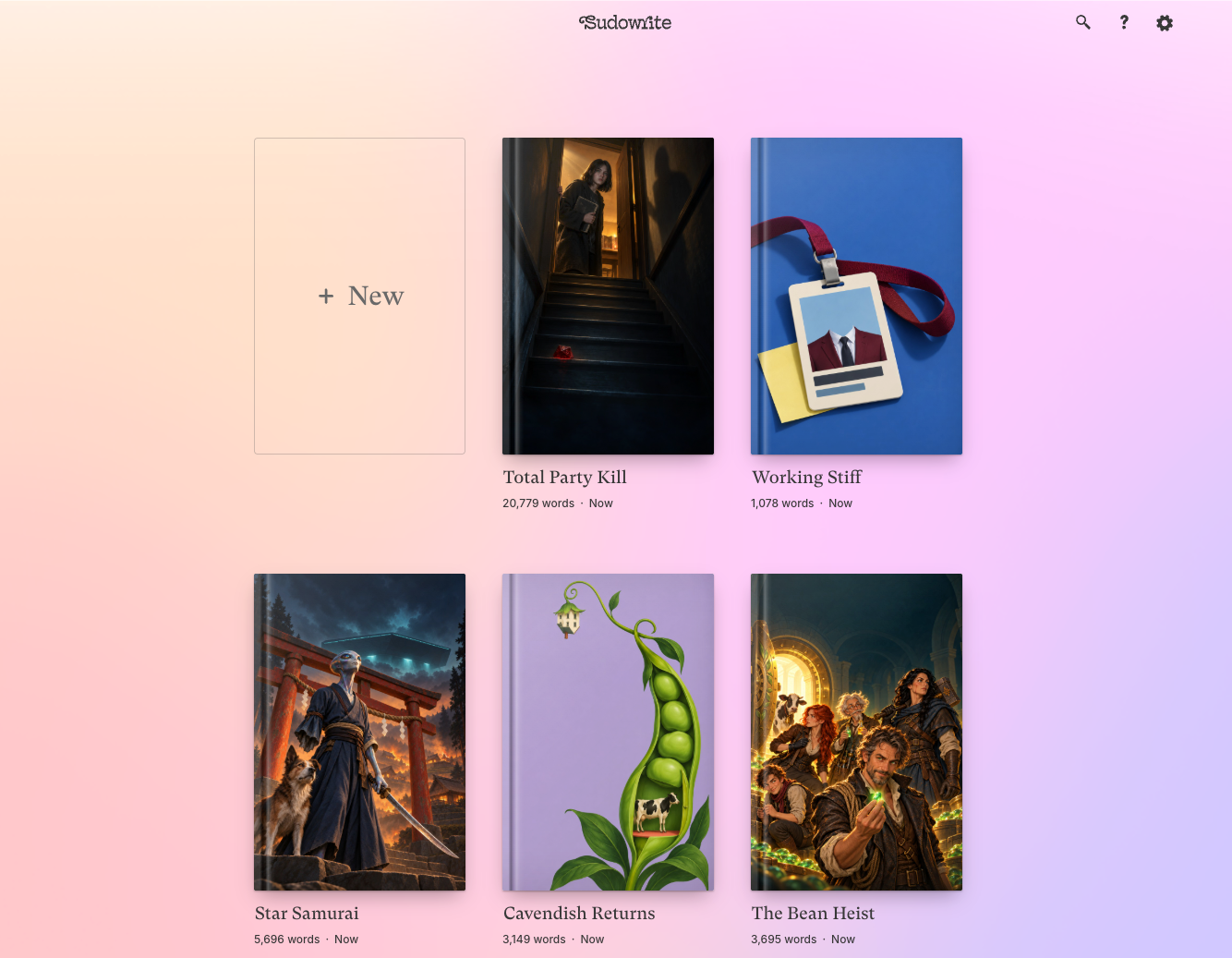
We just gave your Sudowrite homepage a makeover. Your projects now appear as actual books, featuring your very own cover art.
Upload any image as a project’s book cover: your actual cover art, a photo of a vintage store dummy that creeped you out, or just some wallpaper for vibes. You can click the three dots (•••) that appear when hovering on a project to upload art. Your cover art also appears in the top-left whenever you’re working inside a project, so you can click there to add or swap it anytime too.
Shelf Publishing
Folders and series now appear as shelves lined with the books contained within. Click any book’s thumbnail to open that project, or click the shelf itself to open the whole series or folder.
Easier All Around
Project, series, and folder names can now be edited with a single click. Just hover over a name until you see the outline, click, and type.
We also made it way easier to start something new or import your work in progress. Just click the book-sized New button and choose how you’d like to work.
We can’t wait to see how you choose to personalize your workspace! Please share what you come up with in our Discord. (And for those of you who would rather generate cover art than upload from elsewhere… stay tuned!)
Introducing Worldbuilding Images
Last week your cast got their close-ups with the introduction of Character Portraits. Now it's time to pull focus on the rest of your story world.
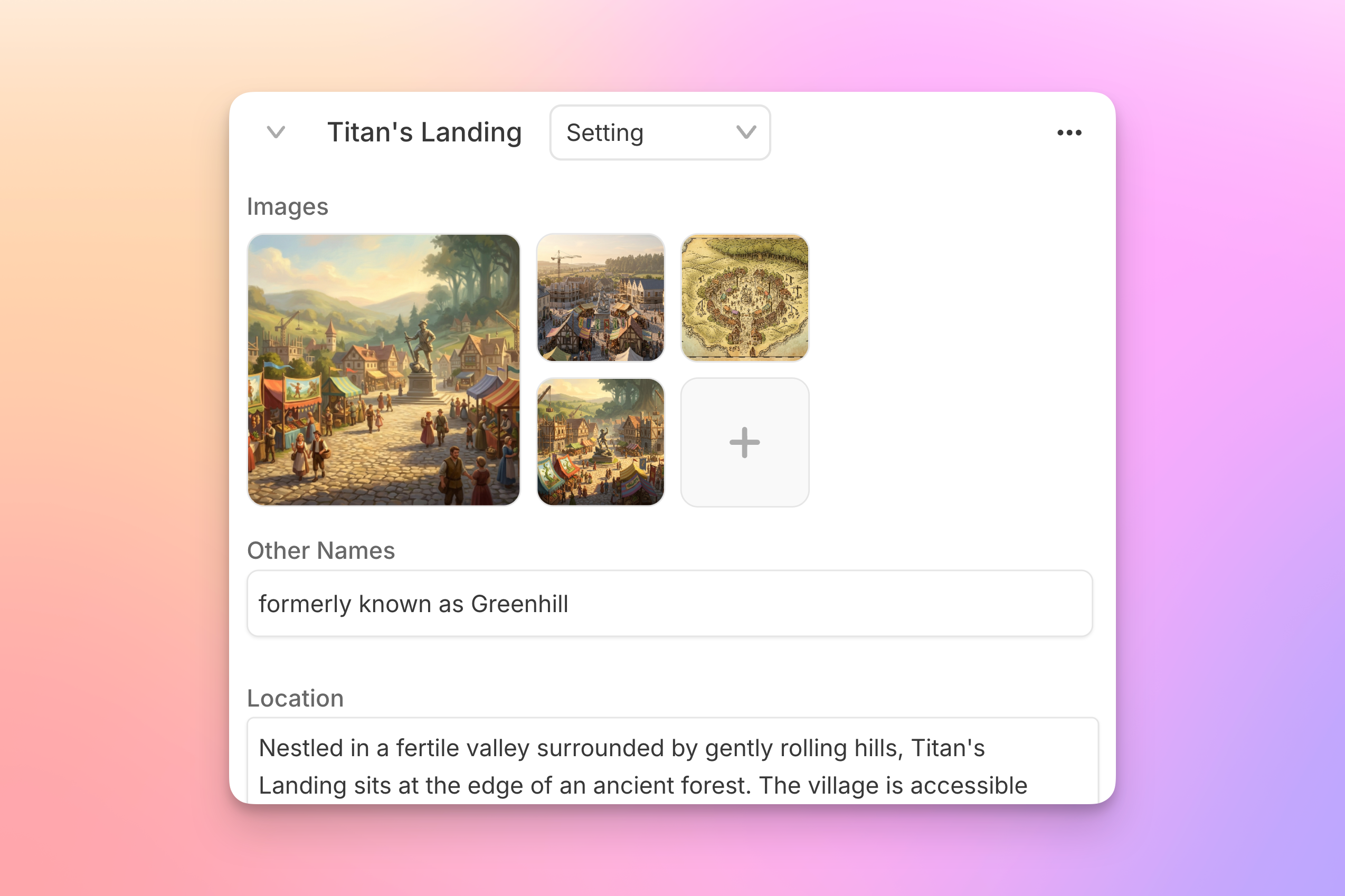
Image support is now available in your Story Bible's Worldbuilding section. The crumbling citadel, the neon-soaked night market, the cursed dagger that also speaks for some reason: you can now generate images straight from your Worldbuilding cards (or upload art you already have), so that every place and thing in your story has a consistent visual reference to match.
One-click generation
Like Character Portraits, Worldbuilding images can be generated with one click, no prompting required. Just select the thumbnail on any Worldbuilding card, choose a style (or four), and hit Generate. Your cards’ existing trait fields are used as reference. Want more control? Add details about the mood, lighting, angle, or whatever else you have in mind.

Your world, at a glance
Every image is saved to that card's gallery, so you can generate options and compare. Set your favorite as the card's thumbnail, and your Story Bible becomes a visual atlas of your world: something to glance at mid-scene when you need to remember where the dagger’s mouth even is.
Worldbuilding images are available now! We hope you'll share your favorites with us in our Discord community!
New AI Model: GPT-6.1 Sol
Barely a week after launching GPT-6 Sol, OpenAI is back with an upgrade: GPT-6.1 Sol is now available, and we've added it to Sudowrite.
OpenAI built this one to be even better at detail-heavy work, and says it makes about a third fewer factual errors than GPT-6 Sol on tricky prompts. For fiction writers, that shows up as better attention to your Story Bible details in longer Drafts. Early reviews of its prose are mixed, with some testers finding GPT-6 Sol's writing a bit more natural. (Try both on the same scene, and see which you prefer!)
GPT-6.1 Sol is available now in Write, Draft, and Plugins. Let us know what you think.
Earlier updates
- Even More New Models: Sonnet 5.5, Gemini 3.7 & 3.8 and MoreClaude Sonnet 5.5 launched today, and we’ve already made it available in Sudowrite. It's Anthropic's new mid-tier model, and it carries over some of the creative writing improvements we saw in Opus 5.5 (which we added last week). In our testing, it's about 30% faster and 30% cheaper than Opus 5.5. We've also added several of the most-requested models from our community: Gemini 3.7 Flash and 3.8 Flash are Google's latest fast models. These brainy boys can handle a huge amount of text at once, which makes them great in Draft and especially strong in plugins that work across your full manuscript. GLM 5.3 is Z.ai's new flagship. It writes consistently solid prose and scores near the top of creative writing benchmarks. It's also one of the least repetitive models in testing, so try it for those long Draft sessions. GLM 5.3 Flash (formerly Ox Alpha) is the lighter, faster version. Qwen 3.8 Max is Alibaba's top model. Try it when you want a completely different-sounding voice on the page. Grok 4.7 is xAI's latest. Reach for it when you want strong prose that can handle no-holds-barred spice or violence. Every model has its own strengths and weaknesses. Our goal is to make as many as possible available in Sudowrite, so you can find the right model for whatever it is you're working on. (Different pens for different pages!) You'll find all these new models in the Prose Mode selector in Write and Draft, and in Plugins too. Let us know what you think, and which ones earn a spot in your regular rotation.New!
- Introducing Character PortraitsYou’ve given your Characters names, aspirations, rich backstories, and probably even some undeserved trauma. Now you can give them faces too. Character Portraits are now available in Story Bible. Effortlessly generate impressive portraits directly from your character cards or upload images you already have, to maintain a persistent visual reference for each character. From description to portrait Portrait generation uses your character’s existing Physical Description, so there’s no need to write a separate image prompt. Open a character card, click the empty Portraits box, choose a style, and click Generate. We’ve included four default styles: Painterly, Cinematic Realism, Bright Editorial, and Storybook. Pick one, or select all four to generate different variations at once. Your brooding antagonist might look surprisingly charming in Storybook. A little art direction Want a particular outfit, expression, or setting? Add instructions in Appearance details to guide the portrait. You can even upload a reference image and explain what you’d like incorporated from that—say, a specific jacket your character should be wearing. For more control over the art style, deselect the presets altogether and describe your own instead. A black-and-white pencil drawing? A vibrant graphic novel look? Give it a try. Your cast, at a glance Every generated portrait is saved to that character’s gallery automatically, so you can keep different looks and compare them later. Already have the perfect image? Use Upload to add it directly to the gallery. Pick your favorite and click Set thumbnail. That portrait will appear beside the character’s name even when their card is collapsed, making it easier to find a familiar face in a crowded Story Bible. You can change the thumbnail or delete unwanted portraits whenever you like. So what are you waiting for? Head to your Story Bible’s Character section and start firing off the glamour shots. We can’t wait to see who you make.New!
- New AI Models: Opus 5.5, GPT-6 Sol & GPT-6 LunaIt was a big day in AI. Three bleeding-edge models landed today—Anthropic's Claude Opus 5.5 and OpenAI's GPT-6 Sol and GPT-6 Luna. All three are now in Sudowrite. Claude Opus 5.5 is the first model in Anthropic's new Claude 5.5 family. Anthropic says it performs at the level of Fable 5.1 on most work, while running more than 30% faster than Opus 5. Anthropic says the writing is clearer, follows instructions more closely, and as one early tester told them, "it writes the way I do." GPT-6 Sol and GPT-6 Luna round out OpenAI's GPT-6 family below Astra. Sol is super smart and makes about half as many factual whoopsies as its predecessor—making it great for Story Bible adherence and a solid choice for Plugins. Luna is the quick, inexpensive choice: useful for lots of shots on goal, brainstorming… anything where you want to generate a lot and sort it out afterward. Each of them uses fewer credits than the model it replaces. In early side-by-side runs on the same passage with the same inputs, GPT-6 Sol came in around 40% cheaper than GPT-5.6 Sol, GPT-6 Luna around 10% cheaper than GPT-5.6 Luna, and Opus 5.5 just barely cheaper than Opus 5. There’s a big gap between these models though, with Sol at roughly a third of Opus 5.5's credit cost, and Luna at about a seventh. That’s a lot of numbers for a site about words though, and what matters is what you think of their prose. All three are available now in Write, Draft, and Plugins. Give them a spin and let us know what you think.New!
- Faster Chat, Better Rewrite & PrintingWe’ve made some big updates to Chat very recently, improving both its speed and performance. Chat responses are now twice as fast - We moved Chat to faster infrastructure this week, cutting response time in half in the process. You should definitely notice it on bigger tasks. Chat makes fewer mistakes - We've been working hard to improve Chat’s performance where it’s most likely to stumble. Our most recent fixes have reduced error rates by 30%, meaning it’s now far less likely to drop context, misplace an edit, or give up. We’re not done yet, though, and there are more Chat improvements to come. Rewrite now runs on our in-house model - Rewrite had been using Anthropic’s Claude Sonnet for a while. We just moved it to Ballad, and the results speak for themselves: authors are now 20% more likely to actually use the resulting Rewrite. If you haven’t tried Rewrite in a while, it’s worth another spin. Actually print your documents - Hitting Ctrl + P or Command + P while viewing the Sudowrite editor used to pop up a blank page and a message about needing a wider browser. Well, good news, folks: it will now print a clean version of whatever document you're viewing.ImprovementFix
- New AI Model: GPT-6 AstraOpenAI just released GPT-6 Astra, their newest flagship model, and we've added it to Sudowrite. OpenAI is calling Astra "a new generation of intelligence"—their most capable model yet. Their launch has focused on how GPT-6 enables complex, technical work, as well as its incredible instruction-following capabilities. For authors, that can mean much stronger continuity across chapters or tighter adherence to the Story Bible. It also makes Astra a great candidate for building and running multistage Plugins on Sudowrite. As for prose quality, our early tests are promising. It sounds a bit more human than prior GPTs. But we still have a lot to learn about how well it handles long-form fiction—we’re excited to hear what you think of it. GPT-6 Astra is available now in Write, Draft, and Plugins.New!
- New AI Model: Claude Fable 5.1Anthropic just released Claude Fable 5.1, an upgrade to their flagship Fable model. We've added it to Sudowrite. Fable 5 has been a recent favorite among Sudowrite authors, and 5.1 is a refinement of that same flagship. Anthropic points to performance gains and (notably for authors) fewer false refusals. In plain terms: 5.1 should be even less likely to balk at legitimate story content—dark themes, violence, heat—so your prose can go wherever the story needs to go. In testing, it was nominally cheaper to use than Fable in the Write button, whereas Draft credit usage is basically identical. We haven't put it through its paces on long-form fiction just yet, so we can’t fully attest to its prose. Maybe you’ll let us know what you think? Claude Fable 5.1 is available now in Write, Draft, and Plugins.New!
- Easier Formatting: Paragraph Spacing & Improved Copy/PasteWe just added a batch of formatting improvements that will give you more control over paragraph spacing and make copy/paste more reliable. Set your own paragraph spacing There’s a new Paragraph Spacing setting in your account settings (under the gear ⚙️ icon in the upper right). Choose your preferred paragraph spacing, and it applies consistently across your projects—no more hand-inserting blank lines for readability. Tidy up empty lines in one click If you (or a prior import) left empty “spacer” lines to provide a visual buffer, a new toolbar button will collapse them for you—either at the document or project level—so you can use the new paragraph spacing settings instead. Copy and paste that preserves your formatting Pasting into Sudowrite from Word, Google Docs, ChatGPT, or Claude now preserves formatting far more reliably. And copying out of Sudowrite will no longer double your line breaks. Imports come in cleaner too, without phantom empty paragraphs. A more polished editor all around Headings now scale with your text size and match your chosen font. Nested bullets now use proper markers with tighter spacing. And your formatting—bullets included—should now appear in the editor exactly the same as it does in cards in your History section. Big thanks to everyone in the community who flagged these copy/paste and spacing issues in recent months. This one’s for you.New!Improvement